
PLUGIN MANUAL
EARLYMURMUR Breach
A one-screen performance synth with an arp you can play.
UPDATED Oct 10, 2026
Breach is a performance synth built for playing live. One knob does one job, two filters do the shaping, and the arp is something you play rather than program.
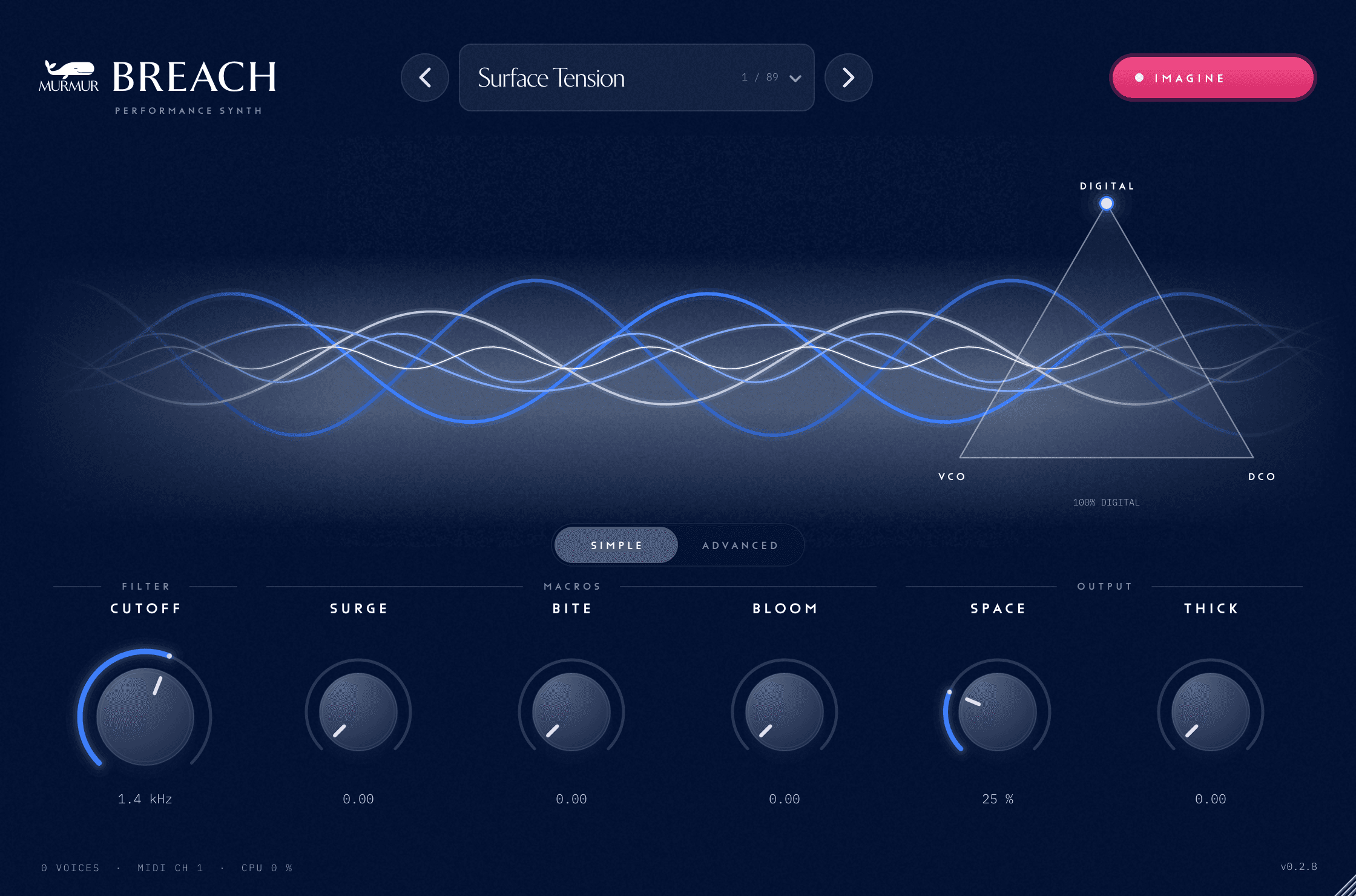
It has two views. SIMPLE shows the band, the character pad and six controls: CUTOFF under FILTER, SURGE, BITE and BLOOM under MACROS, and SPACE and THICK under OUTPUT. ADVANCED shows the whole synth on one page: OSC A, OSC B, PERFORM, FILTER 1 AND FILTER 2, ENVELOPES, LFO, EFFECTS, the ARP and a keyboard. Breach remembers which view you were on with your project.
The character pad blends three voicings of the same synth: DIGITAL, VCO and DCO. Drag between them while you play. The picture below is Breach's own face, drawn by the plugin itself.
THE PANEL
12 things worth knowing
A real screenshot of MURMUR Breach, captured straight from the plugin. Each number below points at the matching part of the panel.
- 1
Patch bar
The name of the sound that is playing, with round arrows either side to step to the previous and next sound. Click the name to open Explore, where you can browse the factory sounds by CHARACTER, TYPE or DESCRIPTION, star favourites, and SAVE AS, RENAME or DELETE your own.
- 2
IMAGINE
Describe a sound in your own words and Breach plays an imagined patch. Ask for changes, then press Keep to name it and add it to My imaginations. Imagine needs your Tidepool sign-in.
- 3
Scope
The band moves with what Breach is playing and swells with the output level. The labels show the sound's category and mood on the left, and live voices and load on the right.
- 4
Character pad
Drag the dot between DIGITAL, VCO and DCO. VCO drifts and wanders, DCO is steady with more sub and chorus, DIGITAL is crisp. The readout shows the blend as percentages. Double-click to go back to DIGITAL.
- 5
SIMPLE and ADVANCED
Switch between the six-control SIMPLE view and the full ADVANCED panel.
- 6
CUTOFF
Opens and closes the filter, from 40 Hz to 18 kHz. The readout shows where it sits.
- 7
SURGE
A macro that moves the cutoff and the filter routing together.
- 8
BITE
A macro that adds drive and resonance.
- 9
BLOOM
A macro that brings in the reverb and the echo.
- 10
SPACE
How much reverb you hear, as a percentage.
- 11
THICK
Zero is clean. Turn it up for tube warmth, a fuller low end and a slower bus compressor. Breach trims the output as it rises, so you get density rather than just level.
- 12
Footer
How many voices are sounding, the MIDI channel, how hard Breach is working, and the version on the right.
GETTING STARTED
1. Install Breach from Tidepool
Tidepool installs Breach and signs it in for you. There is nothing to type in the plugin.
2. Load it on an instrument track
Create an instrument (MIDI) track in your DAW and pick Breach as the instrument. It opens on the SIMPLE view.
3. Play and pick a sound
Play a few notes, then use the arrows either side of the patch name to step through the factory sounds, or click the name to open Explore.
4. Shape it
Turn CUTOFF and the macros while you play, drag the character pad, and click ADVANCED when you want the whole synth.
FAQ
Why is the face covered and Breach silent?
Breach plays only after Tidepool has confirmed your account in the last seven days. Open Tidepool, sign in with the account that has Breach, then press Check again in the Breach window.
Why did my held notes stop when I changed a setting?
Changing Osc A's mode, Osc B's mode, or taking SYNC up from zero or back to it rebuilds the voice and stops held notes. Every other control moves without cutting notes.
How do I save my own sound?
Click the patch name to open Explore, press SAVE AS and give it a name. Your sounds appear under My imaginations, after the factory sounds. Your DAW project also keeps Breach exactly as you left it.
Can I automate Breach?
Yes. Every knob, chip, envelope slider and arp step is a parameter your DAW can automate or map to a controller.
MORE DOCUMENTATION