
PLUGIN MANUAL
EARLYMURMUR Undertow
A monophonic bass line synthesizer with a sub, a string and FM under one face.
UPDATED Oct 10, 2026
Undertow is a bass synth that plays one note at a time. Hold a second key and it slides there at the speed GLIDE sets; let go and it slides back to the key you are still holding. It opens on INIT SUB, a clean sine with a sub an octave below, and it comes with 40 factory sounds from subs and reeses to acid, plucks, FM and wobbles.
The silver upper deck makes and shapes the tone: VCO and SUB OSC are the oscillators, FOLD adds harmonics, VCF is the filter, and VCF ENV and VCA ENV move the filter and the volume on every note. The black lower deck holds your sounds (PATCH and IMAGINE), two more engines that play alongside the VCO (PLUCK, a plucked string, and TX FM, a four operator FM voice), the LFO and the OUTPUT stage.
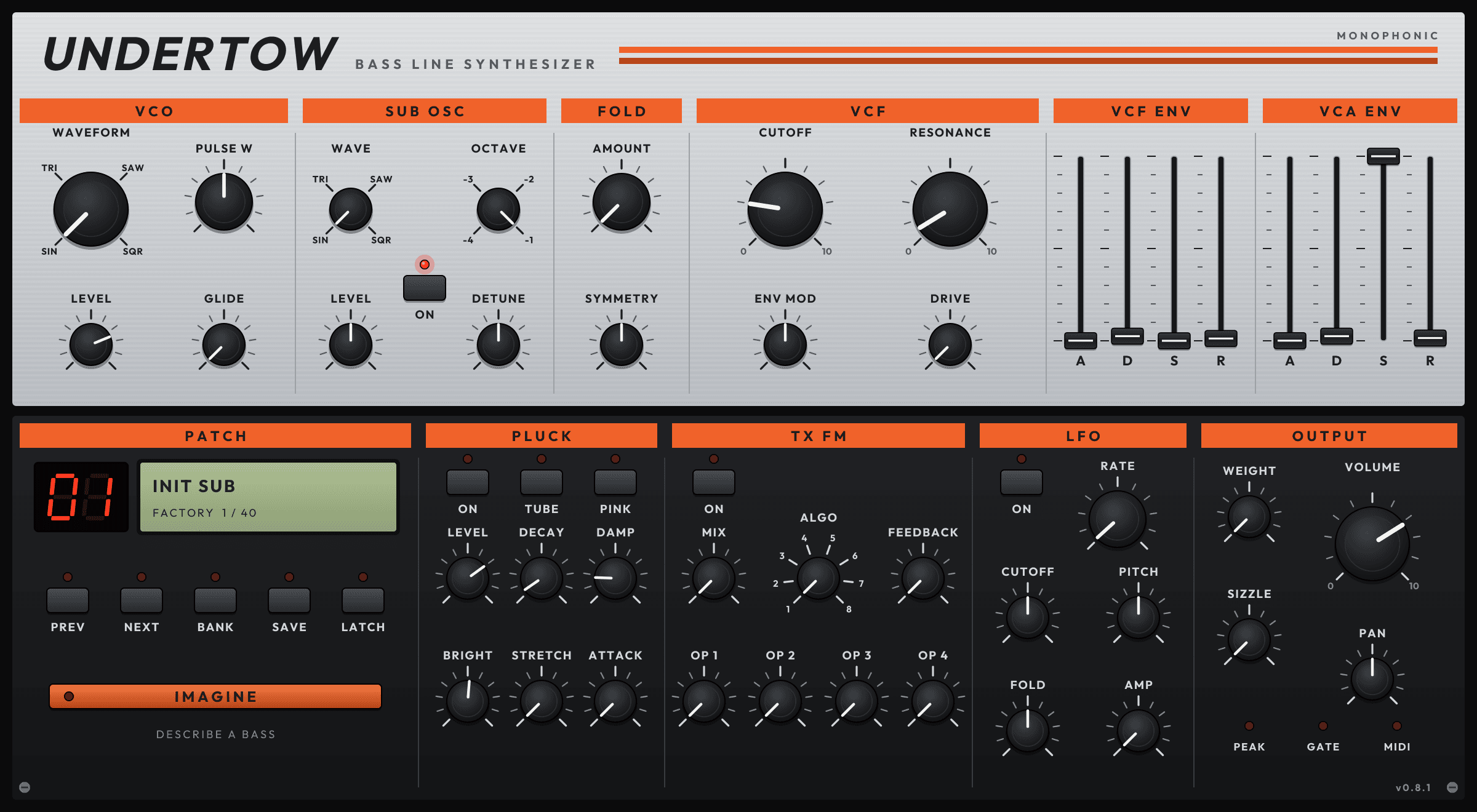
Every knob turns with a vertical drag; hold Shift for fine steps, use the scroll wheel, or double-click to go back to the starting value. The picture below is the plugin's own face, drawn by Undertow 0.8.1.
THE PANEL
14 things worth knowing
A real screenshot of MURMUR Undertow, captured straight from the plugin. Each number below points at the matching part of the panel.
- 1
VCO
The main oscillator. WAVEFORM picks SIN, TRI, SAW or SQR, and PULSE W sets the width of the square. LEVEL sets how loud the VCO and sub are together, against PLUCK and TX FM. GLIDE sets how long overlapping notes take to slide from one to the next.
- 2
SUB OSC
A second oscillator under the VCO. ON switches it on and off. WAVE picks its shape, OCTAVE puts it 1 to 4 octaves below, LEVEL sets how loud it is and DETUNE nudges it off the exact octave for a slow beat.
- 3
FOLD
A wavefolder before the filter. AMOUNT folds the wave for brighter, more metallic harmonics; at zero it is out of the way. SYMMETRY shifts the fold off centre.
- 4
VCF
The filter. CUTOFF sets how bright the sound is and RESONANCE boosts the frequencies around it. ENV MOD sets how far VCF ENV moves the cutoff: right opens it, left closes it, centre does nothing. DRIVE adds saturation before the filter.
- 5
VCF ENV
Attack, decay, sustain and release (A, D, S, R) for the filter, scaled by ENV MOD. A short D with a low S gives the classic plucky bass snap.
- 6
VCA ENV
Attack, decay, sustain and release for the volume of each note.
- 7
Patch display
The red LED shows the factory sound number and the LCD shows the sound's name. The line under it says where the sound came from: FACTORY with its number out of 40, MINE, MY IMAGINATIONS or LIBRARY.
- 8
PREV, NEXT, BANK, SAVE and LATCH
PREV and NEXT step through your sounds. BANK opens the preset browser, where you can browse by GENRE, TYPE, DESCRIPTION or SOURCE and star favourites. SAVE names the current sound and saves it to your MURMUR account. LATCH keeps notes sounding after you let go of the keys; press it again to release them.
- 9
IMAGINE
Describe a bass in your own words and Undertow imagines a patch for it. It loads straight away; press APPROVE within 30 seconds to keep it or REJECT to go back. Imagining holds one KOIN and only spends it when you approve.
- 10
PLUCK
A plucked string that plays alongside the VCO. ON switches it on, TUBE makes it a hollow pipe and PINK plucks it with a darker noise burst. LEVEL, DECAY and DAMP set its volume, how long it rings and how bright the ring stays. BRIGHT, STRETCH and ATTACK shape the pluck itself.
- 11
TX FM
A four operator FM engine. ON switches it on and MIX sets its level. ALGO picks one of 8 ways the operators are wired and takes effect from the next note. FEEDBACK adds grit, and OP 1 to OP 4 set each operator's level.
- 12
LFO
One LFO with four destinations at once. ON starts it and RATE sets its speed. CUTOFF, PITCH and FOLD are centred at zero and move either way; AMP adds tremolo. Some factory wobbles lock the LFO to your project tempo, and on those RATE has no effect.
- 13
OUTPUT
WEIGHT compresses the bass so it feels heavier and more even. SIZZLE adds a bright edge on top. VOLUME sets the output level and PAN places it.
- 14
PEAK, GATE and MIDI
PEAK lights when the output nears clipping, GATE stays lit while a note sounds and MIDI flashes on every note Undertow receives.
GETTING STARTED
1. Install Undertow with Tidepool
Open Tidepool, sign in and install Undertow. Tidepool is the only download, and it signs Undertow in for you, so there is no key to paste.
2. Load it on a MIDI track
Add Undertow as an instrument (VST3 or AU) on a MIDI track. It opens on INIT SUB, a clean sine with a sub an octave below.
3. Play and step through sounds
Play a low note and watch MIDI flash in OUTPUT. Use PREV and NEXT to hear the 40 factory sounds, or BANK to browse them.
4. Shape it and save it
Turn CUTOFF, RESONANCE and the SUB OSC LEVEL until it sits right in your mix, then press SAVE to keep it in your account. Your DAW also keeps every setting with the project.
FAQ
Why does only one note play at a time?
Undertow is a monophonic bass synth. The last key you press wins, and when you let go it goes back to a key you are still holding. GLIDE slides between notes that overlap.
My notes won't stop. What happened?
LATCH is on, so notes keep sounding after you let go. Press LATCH to turn it off. Stopping your DAW's transport also silences everything.
Why doesn't RATE change the wobble?
HALFSTEP WOBBLE, TRIPLET WOBBLE and STEPPED WOBBLE lock their LFO to your project tempo, so RATE has no effect on them. Change the tempo instead, or start from SLOW WOBBLE or INIT SUB.
IMAGINE or SAVE says Sign in to Tidepool.
Both need your MURMUR account. Open Tidepool, sign in, and press the button again. You don't need to reload the plugin.
What does the EXT key on PLUCK do?
It opens a second PLUCK page with PICK, VEL>BRT and HI DECAY, and turns PINK into STIFF for a stiffer string; press EXT again to go back.
Can I automate Undertow?
Yes. Every knob, slider and ON switch shows up in your DAW's automation list, except PLUCK's TUBE, PINK, BRIGHT, STRETCH and ATTACK. Those are still saved with your project and your presets.
MORE DOCUMENTATION