
PLUGIN MANUAL
EARLYPHOSPHOR
A deep synth you can play from eight knobs, or describe in words.
UPDATED Oct 10, 2026
PHOSPHOR is a synth built as a rack. Four pages sit across the top. PLAY is where you perform: pick a sound, turn the eight macros and imagine new sounds. PATCH shows the whole voice, from the eight oscillators to the filter, envelopes, LFOs and effects, joined by cables you can repatch. LAB holds the detailed editors, and BROWSE is the preset library.
Each of the eight oscillators runs its own engine, such as CLASSIC, WAVE, FM, ADDITIVE, PHASE, GRAIN, NOISE, RESO and RELIC, which plays recorded sounds. HEIRLOOM adds classic filter models, a phaser, a flanger and STRING, a modelled string. Movement comes from LFOs, envelopes, generative streams, MORPH and an arpeggiator.
Imagine turns a description such as a dark evolving pad with slow motion into a patch you can play straight away. You hear it before you decide, and it only uses a KOIN if you keep it.
THE PANEL
14 things worth knowing
A real screenshot of PHOSPHOR, captured straight from the plugin. Each number below points at the matching part of the panel.
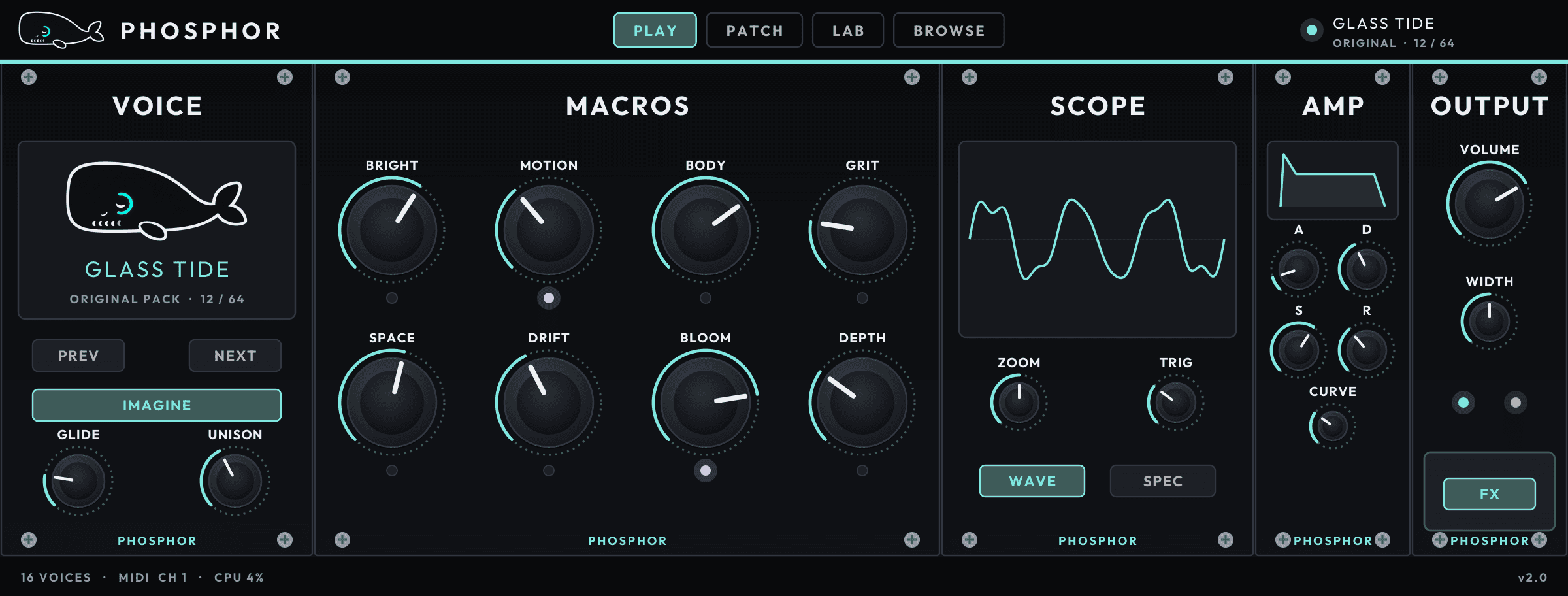
- 1
Pages
PLAY, PATCH, LAB and BROWSE. Click one to switch. OUTPUT stays on the right of every page.
- 2
Loaded preset
The name of the sound that is loaded and its folder. The light is teal while the sound is as it was loaded and turns amber once you change something.
- 3
Preset display
The loaded sound's name, its folder and its place in that folder.
- 4
PREV and NEXT
Step to the previous or next preset. To search by name or category, open BROWSE.
- 5
IMAGINE
Describe the sound you want and PHOSPHOR imagines a patch for it. Press APPROVE within 30 seconds to keep it for one KOIN, or REJECT to go back to the sound you had. Needs Tidepool signed in.
- 6
GLIDE
Slides the pitch from one note to the next. Turn it to zero for no slide.
- 7
UNISON
Stacks more voices on every note for a thicker sound.
- 8
MACROS
Eight knobs that each move several parts of the sound at once. Each preset names them for what matters most in it, such as BRIGHT, MOTION or SPACE. The light under a macro flashes while it moves, for example under automation.
- 9
SCOPE
Draws what PHOSPHOR is playing. WAVE shows the waveform and SPEC the spectrum. ZOOM and TRIG change the picture, not the sound.
- 10
AMP
The volume envelope for every note: A (attack), D (decay), S (sustain) and R (release), with CURVE to bend the slopes. The picture follows the knobs.
- 11
VOLUME
PHOSPHOR's output level. Drag up or down (Shift for fine steps) or double-click to go back to the default.
- 12
WIDTH
How wide the stacked voices spread across the stereo field. The two lights under it show the left and right level.
- 13
FX
Turns the effects chain on and off, so you can hear the sound with and without it.
- 14
Footer
How many voices are playing, the CPU load, and the version.
GETTING STARTED
1. Install PHOSPHOR from Tidepool
Open Tidepool and sign in. It installs PHOSPHOR, signs it in and keeps it up to date. There is no key to paste. PHOSPHOR runs on Apple Silicon Macs with macOS 13 or later.
2. Load it on an instrument track
Quit your DAW completely and reopen it, then pick PHOSPHOR on a software instrument track. In Logic Pro it is under AU Instruments, then Murmur, then Phosphor.
3. Play a sound and turn the macros
Play a few notes, use PREV and NEXT to try other sounds, and turn the eight MACROS to shape them. Open BROWSE to search the library.
4. Imagine your own
Press IMAGINE, describe the sound you want and press GENERATE. Play the result, then press APPROVE to keep it or REJECT to go back.
FAQ
How do I save a sound I made?
Your DAW project saves PHOSPHOR's sound with every change you made. To reuse a sound in other projects, save it with your DAW's own plug-in preset menu. Imagined patches you approve are kept for you under MINE in BROWSE.
Does Imagine cost anything if I don't like the result?
No. An imagined patch uses one KOIN only when you press APPROVE. Press REJECT, or let the 30 seconds run out, and PHOSPHOR goes back to the sound you had.
Why does Logic list it as Murmur?
PHOSPHOR is made by MURMUR, so Logic files it under Murmur. If Logic still shows the old MURMUR name for the synth itself, use Reset & Rescan Selection in Logic's Plug-in Manager and reopen Logic.
I don't see HEIRLOOM in LAB.
Open Tidepool and make sure you are signed in, then quit and reopen your DAW so PHOSPHOR picks it up.
MORE DOCUMENTATION